3D Modeling Software: The 5 Most Popular Programs


Choosing the right one among 3D modeling software is the first requirement for producing a good 3D model. A 3D model is a digital model that represents an object in three dimensions on a computer. In this article we cover the five most popular programs and which one suits which job.
We call the process of developing a 3D model 3D modeling. This process plays a big part in industries like 3D printing, interior design, film, architecture, animation and games.
What is a 3D modeling program and what is it for?
A 3D modeling program lets you model objects with width, length and depth. That way you can see a building, a piece of furniture or a machine part from every angle before it is made. These programs have advanced a lot along with technology. Today there are many options for anyone looking for high-quality 3D modeling software.
But choosing the right software is not as simple as it looks. Each program has a different range of functions and a different area where it is strong. So below we look at the most popular programs one by one.
3D modeling software: the 5 most popular programs
1. SketchUp
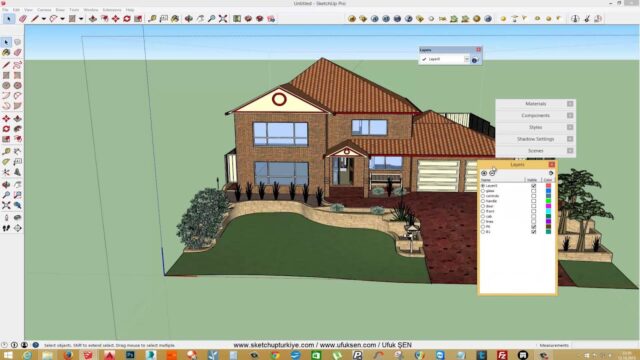
SketchUp is one of the most popular and best 3D modeling programs. It is widely used in civil engineering, film design, interior design, video games, architecture and mechanical engineering. It has both free and paid versions. You can also extend its capabilities with extensions you can customize.
Another plus of SketchUp is its large model library, where users share their projects. For the current versions of the program, visit SketchUp’s official website.
2. AutoCAD
When people think of computer-aided design, the first software that comes to mind is AutoCAD. Unlike other CAD programs, it works like a common language across the industry. Although it is mainly focused on 2D drafting, it is also capable at 3D modeling. You use it often for plans and detail drawings, especially in architectural projects.
3. MeshMixer
MeshMixer lets you create 3D designs suited to 3D printing. If you want to modify an existing model however you like, this program is a good fit. Because it offers the tools you need, you can also build a design from scratch.
4. SolidWorks
SolidWorks is software widely known in mechanical engineering. Thanks to developments in recent years, it brings analysis, design and production cycles together well. This has earned it a strong reputation in the industry. Besides its user-friendly features, it also supports users with tutorial videos.
5. Blender: free 3D modeling software
Blender is one of the most reliable and capable programs on the market. What’s more, it is completely free and ranks among the most capable free 3D programs. Once modeling is done, you can do many jobs in the same program, from 3D animation to 3D printing. You can also use many of its add-ons depending on your project.
To download Blender for free, use the official address:
https://www.blender.org/download/
What to look for when choosing 3D modeling software
Choose a program based on the type of work you do, not on popularity. First answer these questions:
- Purpose: Will you make architectural models, machine parts or 3D prints?
- Learning time: Is the interface simple, and are there plenty of Turkish-language resources?
- Version: Will the free version do the job, or do you need extra features?
- Computer power: Do the program’s hardware requirements suit your system?
- File compatibility: Which file format does your office or client use?
Which 3D modeling program suits whom?
In short, there is no single right answer among 3D modeling programs; the choice depends on the work you do.
Each program has an area where it stands out. To sum up briefly:
- Architects and interior designers: SketchUp offers fast modeling and presentation.
- People doing technical drawing: AutoCAD is the industry’s common language for 2D plans and details.
- People doing 3D printing: MeshMixer is practical for editing print-ready models.
- Mechanical engineers: SolidWorks brings design and production together.
- Animators and anyone looking for a free solution: Blender offers a wide toolset.
If you want to see more options, take a look at our list of the five most popular 3D programs. For an architecture-focused comparison, read our 4 simplest architectural drawing programs article.
From here you can continue with our 6 Standout Architectural Drawing Programs article, then move on to our 3D Architectural Drawing article. To see all topics in one place, check our SketchUp tutorial guide.
Among these 3D modeling programs, SketchUp gives beginners the fastest results. If you want to start with a simple house project, follow the 5 steps in our simple drawing programs article.
Frequently asked questions
What is the easiest 3D modeling program for beginners?
For beginners, SketchUp is usually the easiest option. It lets you build a 3D model quickly with only a few commands.
Is there free 3D modeling software?
Yes, Blender is completely free. SketchUp also has a free version.
Can I make 3D models with AutoCAD?
Yes, although AutoCAD is mainly focused on 2D drafting, it also has 3D modeling tools. For free-form modeling, though, SketchUp or Blender is more practical.