SketchUp 2027 New Features: What Changed? Every Feature

SketchUp 2027 is out. According to the official release notes, Trimble released the new version on October 21, 2026. The version number is 27.0.264. This is one of the biggest updates in recent years. It does not just bring new tools; the interface itself changes too. In this post we go through the new features in SketchUp 2027 one by one, based on the official notes.
In this article:
- A shared interface on Mac and Windows, and working in tabs
- Procedural tools: Copy Along, the new Follow Me and Solid Tools
- Hatch patterns in sections and AutoFit Live Components
- Draw Mode and image adjustments in LayOut
- Changes on the DWG, IFC and USD side
- Who cannot move to SketchUp 2027?
- What extension users need to know
SketchUp 2027 new features: a quick summary
Let’s look at the big picture first. SketchUp 2027 stands out in four main areas. First, Mac and Windows now use the same interface. Second, several models open in tabs in the same session. Third, new procedural tools let you edit without breaking the geometry. Finally, sections get hatch patterns, and file exchange gets new settings.
| Area | What changed in SketchUp 2027? |
|---|---|
| Interface | A shared workspace, toolbars and panels for Mac and Windows |
| Files | Tabs and floating windows you can move to a second screen |
| Modeling | Copy Along, multi-profile Follow Me, procedural Solid Tools |
| Section | Hatch patterns that can be linked to materials |
| Component | AutoFit Live Components that fit themselves when dropped on a face |
| LayOut | Paperless Draw Mode and non-destructive image adjustments |
| File exchange | New DWG/DXF, IFC and USD options |
| System | Apple silicon required on Mac, Windows 10 support ended |
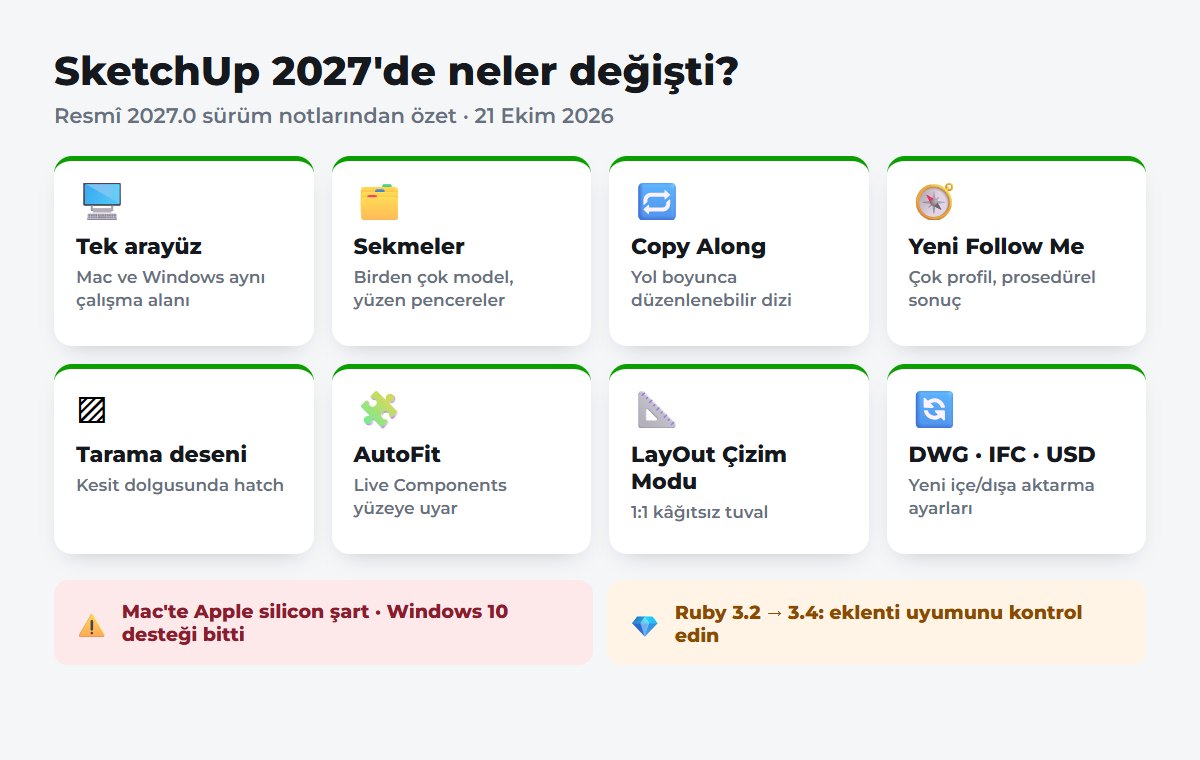
One interface on Mac and Windows in SketchUp 2027
The most visible change in SketchUp 2027 is the interface. SketchUp and LayOut now use the same workspace on Mac and Windows. Toolbars and interface options are shared on both sides too. So teams that switch between the two systems find the same layout.
Mac users gain the most from this update. Mac now lets you dock toolbars to the edge of the screen. Mac also gets trays that hold several panels together. On top of that, the Materials interface and library get a new look. The Ruby Console can now be docked too.
Tabs: working with several models at once
A long-awaited feature has finally arrived. In SketchUp 2027, models and documents open in tabs. You can also drag a tab out and turn it into a floating window. You can move that window to a second screen too. And when you close all the tabs, the application stays open.
This feature is especially useful in offices. For example, you can keep the site plan open on one side and the detail model on the other. That also makes copying between models easier.
SketchUp 2027 procedural tools: editing without breaking geometry
The most important of the SketchUp 2027 new features for modeling are the procedural tools. A new Procedure toolbar arrives. These tools create “procedural components” that you can change later. In short, instead of deleting the result and drawing again, you change the input and the result updates.
Copy Along: copying along a path
Copy Along is a brand-new tool. As the name suggests, it copies objects along a path. For example, you can line up benches, light poles or trees along a footpath. And since the array is procedural, you can edit it later.
The new Follow Me and Solid Tools
The Follow Me tool also has a new version. It now supports multiple profiles. Some Solid Tools also work with procedural components now. The procedural settings show up in the Entity Info panel.
There is also a new right-click option: Explode to Inputs. This option removes the procedural component but keeps the geometry. So if you like, you can turn the result into ordinary geometry and continue the classic way.
Hatch patterns in sections
There is another important new feature for architects. In SketchUp 2027, you can add hatch patterns to section fills. Patterns are managed in the new Hatch Patterns panel. You can also link a pattern to a material and set it from Entity Info or from the Styles panel.
The “Override Section Fill by Style” option in Styles lets you switch between two looks. On one side there is the classic single-color fill. On the other there are patterns that change by object or material. For pattern files, SketchUp recognizes .skh, .PAT and image-based patterns. That makes section and plan output easier to read without needing another program. If you are just learning to make sections, our post on creating sections and plans in SketchUp is a good start.
AutoFit Live Components and Outliner sorting
Live Components get a nice convenience too. Now, when you drag a Live Component and drop it on a flat face, the component adjusts itself to that face. This also works for faces inside another group or component. You can change its orientation while placing it too.
The Outliner panel gets a new Sort By option. The default order is still the model hierarchy. But now you can also sort objects by tags. Untagged items sit in a separate group. To organize large models with tags, also see our post on using tags in SketchUp.
Touchpad and location (CRS) support
There is news for laptop users too. The touchpad controls that Mac already had now come to Windows as well. According to the official notes, on Windows you use Control + Alt for Orbit and Shift + Control + Alt for Pan. You can see the classic shortcuts live on our interactive shortcuts page.
On the location side, Add Location now works with a coordinate reference system (CRS) file. This lets you place the model at the correct coordinates. You can enter Easting and Northing values for the project base point. SketchUp also calculates the elevation itself and takes true north into account.
What changed in LayOut with SketchUp 2027?
LayOut also gets two important new features in this release. The first is Draw Mode. When you enter this mode from the Scaled Drawing panel, you draw on a paperless canvas with real coordinates at 1:1 scale. When you leave the mode, your drawing turns into a group at a default scale. In metric units, that scale is 1:50.
The second new feature is image adjustments. You can now adjust opacity, brightness, contrast, hue and saturation in viewports and images. And these adjustments are non-destructive, so the original image is not damaged. That means you do not need to switch to another program for small fixes on presentation sheets. If you are new to LayOut, you can start with our SketchUp Pro and LayOut post.
DWG, IFC and USD: file exchange
There are many new features for people who work with other programs too. Here are the important ones:
- DWG and DXF: import gets tessellation settings and ready-made presets. There are also new controls for text, dimensions and hatching. On export, you can choose smooth (SubD) or flat-faced (Polyface) geometry.
- IFC and TrimBIM: when importing, you choose whether tags come from IFC classes or IFC layers. Coordinate information is also exported to the IFC file.
- USD: USD, USDA and USDZ formats can be both imported and exported.
- Scan data: with Trimble Scan Essentials, .RCP, .TDX and Gaussian Splatting .PLY files are imported directly.
The DWG settings matter especially for people bringing projects over from AutoCAD. You now decide how many segments incoming curves are split into.
Who cannot move to SketchUp 2027?
Be sure to read this section before upgrading. SketchUp 2027 cannot be installed on some computers:
- Macs with Intel processors: SketchUp 2027 requires Apple silicon on Mac. For Intel Mac users, SketchUp 26.2 remains the fully supported older version.
- Windows 10: Windows 10 support ended with SketchUp 2027. According to the official page, 2027 requires Windows 11. The program can be installed on Windows 10, but there is no official support and instability may occur.
If your computer does not meet these requirements, you can keep working with SketchUp 2026. We collected everything about safe downloads and versions in our SketchUp download guide. Also check the official system requirements page.
SketchUp 2027 and extensions: the Ruby 3.4 change
If you use extensions, this change affects you directly. In SketchUp 2027, the embedded Ruby version went from 3.2.2 to 3.4.9. According to the official notes, compiled (native C) extensions need to be recompiled for Ruby 3.4. The Mac interface also now uses Qt instead of Cocoa.
So do not upgrade right away for important work. First confirm with each developer that the extensions you use are compatible with 2027. To install extensions safely, see our SketchUp plugin guide.
Other changes and bug fixes
The new version also has a new hidden line engine called Hidden Line Rendering (HLR). This engine comes turned on by default as a SketchUp Public Labs feature. If you run into problems, you can switch back to the classic engine in Preferences.
Trimble also fixed many bugs. For example, Push/Pull no longer crashes on duplicate edges. The Move tool no longer flips in copy mode. Security vulnerabilities in KMZ files and corrupted model files were also closed. LayOut also no longer crashes when closing or undoing.
Should I upgrade?
Our advice: if you use Apple silicon on Mac or Windows 11, try SketchUp 2027. Tabs, Copy Along and section hatch patterns in particular save real time in daily work. But if your workflow depends on extensions, do not rush. First install 2027 separately and test your extensions. Then move your main work over.
If you are new to SketchUp, starting with the current version is best. For that, our SketchUp learning path takes you from zero all the way to rendering. If you want to test your knowledge, you can also take our SketchUp quiz.
Summary
SketchUp 2027 is a major release that renews both the interface and the modeling logic at once. Mac and Windows meet in one interface, and models open in tabs. Procedural tools let you edit the model without breaking it. Section hatch patterns, LayOut Draw Mode and new file format settings also make technical drawing easier. On the other hand, Intel Mac and Windows 10 users cannot move to this version. Extension users should also check compatibility because of the Ruby 3.4 change. For all the details, see the official release notes.
Frequently asked questions
When was SketchUp 2027 released?
According to the official release notes, SketchUp 2027.0 was released on October 21, 2026. The version number is 27.0.264.
Does SketchUp 2027 run on Windows 10?
Officially, no. Windows 10 support ended with SketchUp 2027. The program can be installed, but unexpected instability may occur. So Windows 10 users should stay with SketchUp 2026.
Can SketchUp 2027 be installed on an Intel Mac?
No. SketchUp 2027 requires Apple silicon on Mac. For Intel Macs, SketchUp 26.2 remains the supported older version.
Will my extensions work in SketchUp 2027?
The extension’s developer is the best one to tell you. Because of the move to Ruby 3.4, compiled extensions need to be recompiled. So check the extension’s 2027 compatibility before upgrading.