SketchUp V-Ray Blend Material: Super Mixed Material 09

This is our best lesson on the V-Ray Blend material in SketchUp. The Blend material is the best way to create mixed materials. Used this way, V-Ray’s features in SketchUp help you build more complex, higher-quality materials.
 YouTube
What’s in this video?
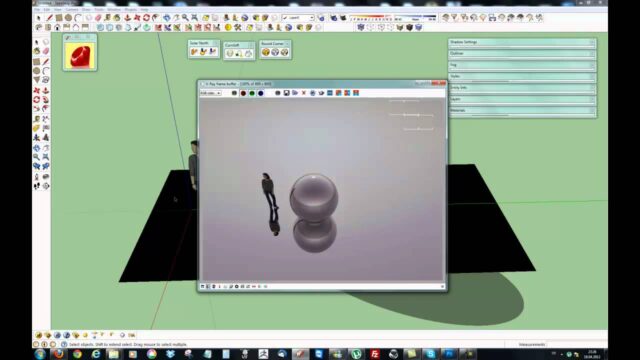
In this lesson we work with V-Ray’s Blend material in SketchUp. As we wrote in the description, the Blend material is one of the best ways to create mixed materials. Our goal is to get more complex, higher-quality materials by making use of V-Ray’s features. (The video is in Turkish; this guide walks through the key steps in English.)
- What the Blend material is for
- Bringing more than one material together on a single surface
- Creating richer, more convincing surfaces with this method
The video description has no chapter timestamps. In the description we also shared a texture site for anyone who wants to download free materials. TextureFun is no longer online; today you can find free SketchUp textures in the bestsketchupplugins.com texture library. The “09” in the title shows that this is the ninth part of our materials series.
Who is it for?
The video runs about 8 minutes. It is a short but dense lesson, so we recommend opening your own scene and trying along. If needed, pause the video and repeat each step on your own material.
- V-Ray users who have learned basic materials and want to take the next step
- Architects who want to show worn, dirty or layered surfaces realistically
- Interior architects who want to add detail to floor, wall and furniture surfaces in particular
- Students who want to understand how materials work in depth
Before you watch: what is a Blend material in SketchUp and V-Ray?
In the real world, surfaces are rarely made of a single material. For example, you see patches of moss on a stone wall, rust on a metal door or varnish marks on a wooden table. A single material struggles to carry this variety.
A Blend material layers other materials on top of a base material. A map or mask usually decides where each material shows. That way you combine two separate materials on a single surface with a natural transition.
Used carefully, this method adds a great deal of realism to an image. However, as the number of layers grows, the material gets harder to manage. That is why the safest path is to start with two layers and look at the result. For the basics of material management in SketchUp, you can also look at the official Help Center.
Where is the Blend material useful?
Mixed materials make a difference especially where a surface changes over time. These are the examples we turn to most in our projects:
- Plaster and concrete surfaces on a facade with rain streaks or dirt
- Mossy stone, gravel mixed with soil or wet ground in a garden
- Rusted metal and paint worn over time in industrial spaces
- Matte and glossy areas on polished wood in furniture
- Two different yarns or patterns appearing together in fabric
What these examples have in common is that a uniform surface never really exists. That is why even a small mix frees the image from that “computer drawing” feel.
Tips for working with the Blend material
- Prepare the two materials separately first. If each one does not look right on its own, the mix will not look right either.
- Pay attention to the scale of the map you use as a mask. A pattern that is too small makes the surface look artificial.
- Keep the transitions soft, not hard. In nature, dirt and wear usually build up gradually.
- Check the material under different lighting. A mix that looks good in daylight looks different in evening light.
- Finally, save the materials that work to your library. That way you do not start from scratch in later projects.
Related lessons
- The previous part of the Blend material lesson (08): the part right before this lesson.
- Applying materials to sloped surfaces with Triplanar: another method for complex surfaces.
- How materials work physically: to strengthen the basics before moving to Blend.
- Create your own high-quality material: the second part of the series.
- Our render guide: brings the other render topics together on one page.
Frequently asked questions
Does a Blend material slow down the render?
As the number of layers grows, so does what the engine has to calculate. That is why we recommend using it only on surfaces that are visible to the camera and really need it.
Can’t I just use two separate materials instead of Blend?
You can, but you get a hard edge between the two materials. A Blend material combines two materials on the same surface with a soft transition.
Which image should I use for the mask?
A texture made of black and white tones that suits the scale of the surface is a good start. The light and dark areas decide where each of the two materials shows.
Do I need to finish the earlier parts of the series to watch this lesson?
It is not required, but if you know the basic settings of V-Ray materials in SketchUp, you will follow the lesson much more easily.