SketchUp V-Ray 3.6 Material Tutorial Set


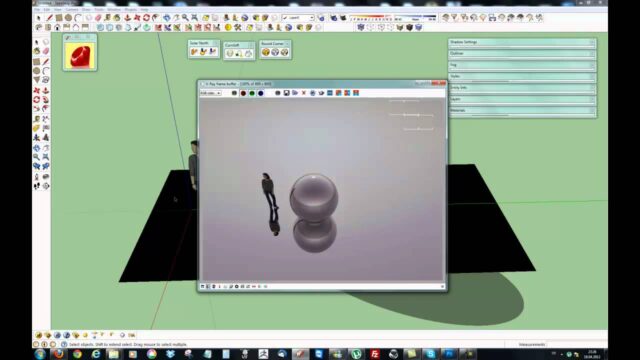
Our V-Ray material tutorial set is a video series on building realistic materials with SketchUp V-Ray 3.6. The first lesson starts with making a high-quality metal material. When it is not set up correctly, metal is one of the materials that looks fake most easily. That is why we chose to open the series with this difficult but instructive material.
In this article we share the logic of metal materials, the settings to watch and how to follow the series. All the videos on our channel are free, and this series is too.
V-Ray material tutorial playlist
The first lesson in the list is about nine and a half minutes on making a metal material. You can move to the other lessons from the playlist.
 YouTube
Why is metal a difficult material?
Metal behaves differently from other materials. On surfaces like wood or paint, the Diffuse channel sets the color. In metals, the color is carried mostly by the reflection. In other words, the yellow of gold comes from its reflection, not from the surface itself. (The video is in Turkish; this guide walks through the key steps in English.)
This difference makes it very easy to set up metal wrong. For example, if you pick a gray Diffuse color and a white reflection, the result looks like plastic. For realistic metal, you need to give the color to the reflection.
Basic settings for a metal material
When we build a metal material in V-Ray, we generally look at these points:
- Diffuse: for metals we pick a very dark, almost black color.
- Reflection color: carries the color of the metal. We pick light gray for chrome, yellow for gold and orange tones for copper.
- Glossiness: we use a high value for polished metal and a lower value for brushed or matte metal.
- Fresnel: in metals the reflection is strong from every angle, so pay extra attention to the Fresnel setting.
Of course, these values are only a starting point. You will need small corrections depending on the scene’s lighting. So take a small test render after every change.
Why does the V-Ray material tutorial start with metal?
Metal is the material that shows the logic of reflection most clearly. Once you understand metal, other materials come much more easily. That is because surfaces like glass, ceramic tile and polished wood rely on the same reflection principles.
Metal is also the surface that reflects its surroundings the most. So the scene’s lighting setup and environment directly affect the result. A metal object instantly reveals how well your lighting and your HDRI are set up.
Types of metal and how they differ
Not every metal reflects the same way. Knowing these differences makes your material more convincing.
- Chrome: reflects almost like a mirror, with a neutral tone.
- Stainless steel: reflects a bit more matte and slightly blurrier than chrome.
- Brushed aluminum: the reflection stretches in one direction, so settings like anisotropy are useful.
- Gold and copper: their reflections are clearly colored.
The role of light and environment in metal materials
The quality of a metal material does not depend on the settings alone. Because metal reflects its surroundings, the rest of the scene also shapes the result. So place something around metal objects for them to reflect. In a kitchen, for example, cabinets, a window and walls create nice reflections on metal surfaces.
Also use a good-quality HDRI with a Dome Light. The HDRI gives the metal a real sky and environment to reflect. Even the simplest metal material then looks much richer.
The physics behind materials
The same physical logic sits behind every material, metal included. When light hits a surface, it is either absorbed, bounces off or passes through. We explained this with examples in a newer series. For details, see our article on the physics of materials.
We showed how to build materials in a current version in our creating a new material in V-Ray 5 lesson. For free textures to use in your materials, take a look at our free texture site article.
Common mistakes during the V-Ray material tutorial
The most common mistake is giving metal a light Diffuse color. The metal then looks dull and plastic. The second mistake is testing the metal object in an empty scene. If metal finds nothing to reflect, it stays black and lifeless. So always run your tests with an HDRI or in a full scene. Finally, do not give every metal the same Glossiness value, because the surface finish defines the metal’s character.
For official information on V-Ray’s material system, visit the V-Ray for SketchUp page from Chaos.
Frequently asked questions
Which version was the V-Ray material tutorial made with?
We made the series with SketchUp V-Ray 3.6. The material logic still applies in newer versions.
Why does my metal look like plastic?
Most likely the Diffuse color is too light. Darken the Diffuse color and give the metal’s color to the reflection.
How should I test a metal object?
Use an HDRI or a full scene that gives the metal an environment to reflect. In an empty scene, metal looks black.