Render Fun: A Free SketchUp Render Plugin Developed in Türkiye


You deserve to see a model you worked hard on look like a photo without setting aside a new license budget. Render Fun was born from exactly this idea: a free SketchUp render plugin that we developed in Türkiye and that runs inside SketchUp. In this article we explain what Render Fun is, how it works, its best features and why we can comfortably promise to “turn your SketchUp model into a realistic image”.
In this article:
- What is Render Fun?
- How does it work?
- Render Fun’s best features
- Reliability: measured results
- System requirements
- Suggested order for your first day
- Where to download it
What is Render Fun?
Render Fun is our own render engine written for SketchUp. It opens as a window inside SketchUp and reads the model directly: triangles, materials and textures, the camera, the sun and lamps. There is no separate program, no file to export and no import step. When you move the camera or change a material, the render window follows along.
In short: GPU-based path tracing. Inside SketchUp. Free. No account, no license key; you can use it for personal and commercial work.
Why a free SketchUp render plugin?
In our 18 years of teaching SketchUp, the sentence we heard most was: “I finished the model, but I can’t render it.” Sometimes the obstacle was the learning curve, sometimes the hassle of exporting files to a separate program, and sometimes the license budget. Render Fun was written to remove all three obstacles at once. For a general comparison of render engines, see our SketchUp render engines article.
How does it work?
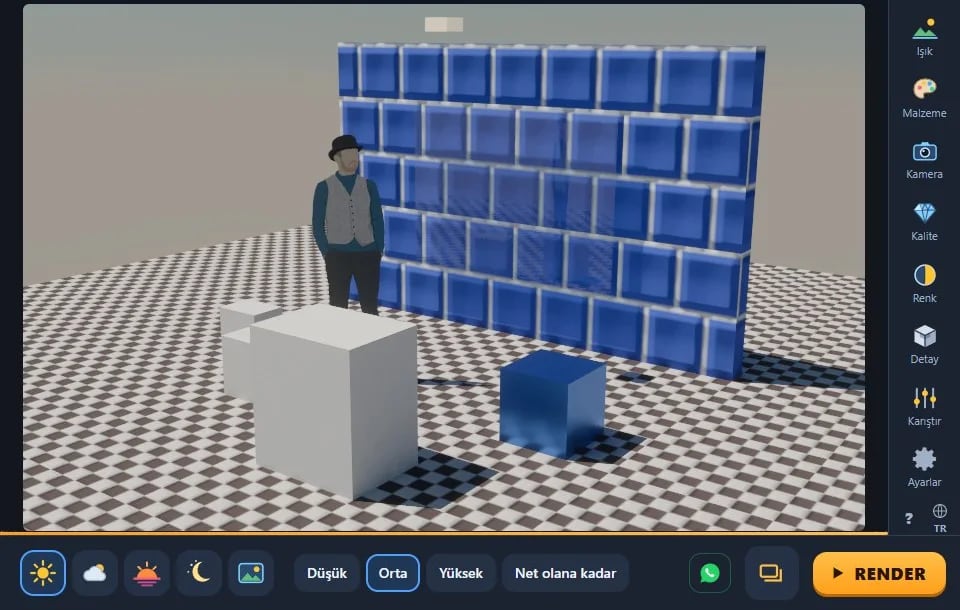
The graphics card traces rays for every pixel: it follows light that bounces off walls, passes through glass and falls into shadow. This is called path tracing. The first image appears on screen right away; each pass adds new light samples, and the picture cleans up while you watch. You can stop it the moment it looks good enough, or let it stop on its own with the “Until clean” option.
While you work, a fast denoiser keeps the preview clean. On Windows, an AI denoiser runs once at the end of the final render.
Render Fun’s best features
Fast real time
Press the “Real time” button on the toolbar and walk through the model with W A S D. Sun shadows, bounced light, reflections and glass are drawn instantly. When you press RENDER at the angle where you stop, you get the ray-traced image.
One-click preset scenes
Interior day or night, exterior day or sunset. With one press, the lighting, color and detail are ready; then suggestions for your scene follow.
Sun, sky and HDRI
You can use a physical sky with SketchUp’s own sun, 10 built-in CC0 HDRIs, your own .hdr and .exr files, and SketchUp 2025+ environments.
One-click materials
Click a surface and choose matte, glossy, metal, glass, mirror, water, fabric or car paint. SketchUp 2025 PBR maps are read; a material library with 20 categories and 298 texture sets comes ready.
Lamps and the light mixer
Point, spot and panel lamps, IES light distribution, and a light mixer that changes the intensity and color of lamp groups after the render is done.
Plants, Smart Check and Render Buffer
- Our own plant pack with 129 species: scatter them, line them up along a path or turn surfaces into grass.
- Smart Check: lists the things that slow down or break the render, and fixes the ones you mark in one step.
- Render Buffer: every finished render is numbered and collected in one window; no file is ever overwritten.
- Before / After: turns the SketchUp view and the render into a slider page or a 5-second video.
Reliability: measured results
Render Fun’s test report is public. On the benchmark page, each test opens SketchUp itself, builds a model, renders it and measures the result. In the latest report, 206/206 SketchUp runs and 1,162/1,162 checks passed. The full version history is also listed item by item on the updates page.
System requirements
- SketchUp: 2021–2026; best results in 2023 and later. SketchUp 2020 and earlier are not supported.
- Operating system: Windows. macOS has not been tested yet.
- Graphics card: a card with WebGL2 support. Render Fun sets the quality for the card by itself. So far it has been measured on an NVIDIA RTX 4090; there are no measurements on integrated graphics yet.
- Internet: not required. The HDRIs, textures and denoiser are inside the plugin.
- Language: Turkish and English.
For general information on choosing a graphics card, see our render computer article.
Suggested order for your first day
When you meet a free SketchUp render plugin, trying every feature at once gets confusing. For your first day, we suggest this order:
- Start with a preset scene. Choose the interior or exterior scene that suits your model and take your first render.
- Run Smart Check. If the model comes from old projects, clean it up first.
- Fix the materials. Give glass Glass and metal surfaces Metal; you will see the difference right away.
- Adjust the lighting. Set the sun time for exteriors and the lamps for interiors.
- Save and compare. Look at your earlier attempts side by side in the Render Buffer.
This order teaches you step by step how each setting changes the image. After a few projects, starting from a preset scene and reaching your own settings takes minutes. You can also save the settings you like under a name with “My render settings” and apply them in other projects with one click.
Where to download it
Render Fun’s only official address is renderfun.com. The download button, installation steps and gallery are there. To install, you close SketchUp, open the .rbz file with WinRAR or WinZip and extract its contents into SketchUp’s Plugins folder. You can find step-by-step instructions on the Lesson 1: Installation and first render page.
Summary
In short, Render Fun is the free SketchUp render plugin we developed in Türkiye for anyone who wants photorealistic images without leaving SketchUp. Fast real time, preset scenes, material and plant libraries, Smart Check and Render Buffer, all in one window.
These two related articles will help too: Installing a SketchUp Render Plugin and Who Is Render Fun For? Architects, Interior Architects, Furniture Makers and Students. Our SketchUp render guide also shows you step by step where to go next.
Frequently asked questions
Is Render Fun really a free SketchUp render plugin?
Yes. It is free to download and use, for personal and commercial work, with no account or license key.
Do I need a powerful graphics card?
It runs on any card with WebGL2 support and picks the quality to suit the card. A faster card only cleans up the image sooner.
Does it work on a Mac?
It has not been tested on macOS yet, so we do not say it works. Today it is developed and tested on Windows.
Does it change my SketchUp model?
Only what you ask it to. Render settings are saved with the model; a material choice or lamp change can be undone in one step.
Is Render Fun updated?
Yes. Every version is listed in one line on the updates page at renderfun.com.
Which languages is Render Fun available in?
The interface is in Turkish and English; there is also an illustrated guide inside the plugin.