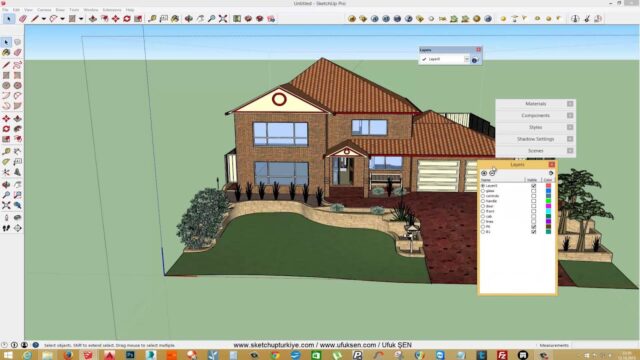
What Is an SKP File? The SketchUp File Extension


What is SKP, and what does it mean? SKP is the extension of SketchUp’s own model file; in other words, every file ending in .skp is a SketchUp model. You open it with SketchUp or the free SketchUp Viewer.
When you are new to SketchUp, one of the first questions is what kind of file you are actually saving. The basic SketchUp file extension is .skp. In short, an SKP file is the 3D model file SketchUp creates. SketchUp itself is an easy-to-use 3D design program. The file holds a model that includes wireframes, shadows, edge effects and textures.
SKP files sometimes also contain components that you can add to other SketchUp documents. In this post we cover the SKP file, automatic backups and the other extensions related to SketchUp.
What is SKP? What you need to know about the SketchUp file extension
SketchUp is a 3D modeling program used mainly to create architectural models. The models you make in the program are stored in SKP files, also known as SketchUp documents. And an SKP file does not have to be a complete building. For example, you can save a single component such as a door, window or beam as its own SKP.
Keeping components in separate SKP files makes life much easier for the designer. You can bring the same door or window into different projects again and again. That way you do not have to draw the same part from scratch in every project.
A short history of SketchUp
Today SketchUp belongs to Trimble. Before that, it belonged to Google and @Last Software. @Last Software released all versions up to version 5. After that came Google SketchUp version 6. That is why you may also see the program called Google SketchUp in older sources.
The SKB extension: the SketchUp backup file
The Windows version of SketchUp automatically creates backups of your SKP files. These backups carry the .SKB extension. If you accidentally delete an SKP file or the file gets corrupted, you can recover your work from its SKB counterpart.
To do that, make a copy of the SKB file and change its extension to .skp. Then open the file in SketchUp. The macOS version of SketchUp stores backups as “filename~.skp” instead of using a separate extension.
Does SketchUp save backup files?
Yes, but the related settings need to be turned on. The backup file keeps updating every time you save an existing file. You turn on auto-save and backups in Window > Preferences. That way you will not lose your latest work if SketchUp closes unexpectedly.
The backup file is usually in the same folder as the original file. So keeping your projects in a tidy folder structure also makes it easier to find the backup.
What is an SKP file, and how do you open it?
You can open an SKP file with Trimble SketchUp on Windows and Mac. Another option is SketchUp Viewer, available for Windows, Mac, iOS and Android. SketchUp lets you view and edit the model. SketchUp Viewer only lets you view it.
Watch out for version differences too. An older SketchUp version cannot always open an SKP file saved in a newer version. So ask the person you are sharing the file with which version they use. If needed, pick an older version format in the Save As window.
You can find more about the Viewer in our what is SketchUp Viewer post. For the program’s official introduction, you can also visit the SketchUp Viewer page.
SketchUp models are also suitable for placing on Google Earth. You can also share your models on Trimble’s online library, 3D Warehouse.
Which applications open SketchUp file extensions?
File information sites list many extensions related to SketchUp. Below we gathered these extensions and their developers:
- Trimble Inc. with the RBZ extension
- Interscape with the CCF extension
- Microsoft Corporation with the CPL extension
- Trimble Inc. with the STYLE extension
- Trimble Inc. with the TBP extension
- Trimble Inc. with the GLTF extension
- Trimble Inc. with the SKP extension
- Trimble Inc. with the DGF extension
- Concept Software with the LF extension
- Trimble Inc. with the DB1 extension
The extensions you will run into most often in daily work are SKP, RBZ and STYLE. RBZ is the installation package for SketchUp extensions. We explained extension installation in our SketchUp extensions post. STYLE is the file type that stores display styles in SketchUp.
What to do if an SKP file gets too big?
As the project grows, the SKP file gets heavier and SketchUp starts to slow down. In that case, first go to Window > Model Info > Statistics. Then clean out the components and materials you do not use with Purge Unused. High-resolution textures and heavy ready-made models also make the file bigger. In the video below we show step by step how to make a SketchUp file lighter.
 YouTube
What is SKP and the SketchUp file extension: frequently asked questions
What does SKP mean?
SKP is short for “SketchUp” and is the extension of SketchUp model files. If a file name ends in .skp, that file is a 3D model made in SketchUp. (The video is in Turkish; this guide walks through the key steps in English.)
Why is the SketchUp file extension .skp?
SKP is SketchUp’s own model format and takes its name from the program’s abbreviation. Every model you save in SketchUp carries this extension.
How do I open an SKB file?
First make a copy of the SKB file. Then change the copy’s extension to .skp and open the file in SketchUp.
Can I view an SKP file without SketchUp?
Yes, you can inspect the model with SketchUp Viewer. But you need SketchUp to make changes to the model.
These two related posts will also help: Reducing SketchUp File Size and What to watch for when moving files from SketchUp to Lumion. Our SketchUp tutorial guide also shows you step by step where to go next.